Fifty Undo Points, None in the Saved Project
A CLI-Anything GIMP replay separates live undo history, saved project state, and external image files across command invocations.
I created a project through a CLI, added a layer in a second invocation, then asked a third invocation to undo it. The project still contained the layer. The command exited with code one and reported Nothing to undo. Saving the edit had preserved the project state, while the undo stack belonged to the process that made it.
This matters when an agent drives software through repeated shell commands. The tool can expose an undo command and still require a persistent process to retain its history. A saved file, a live session, and the assets referenced by that file each have a different recovery boundary.
I checked CLI-Anything revision 34f519533bc175d2fe287ab8316b0dd99bb9cc43, specifically its GIMP harness, version 1.0.0. I ran the actual Python CLI and an independent probe on Linux with Python 3.12.14, Click 8.4.2, and Pillow 12.3.0. These checks exercise project and session handling. They do not run GIMP, render an image through its backend, or inspect native XCF undo history.
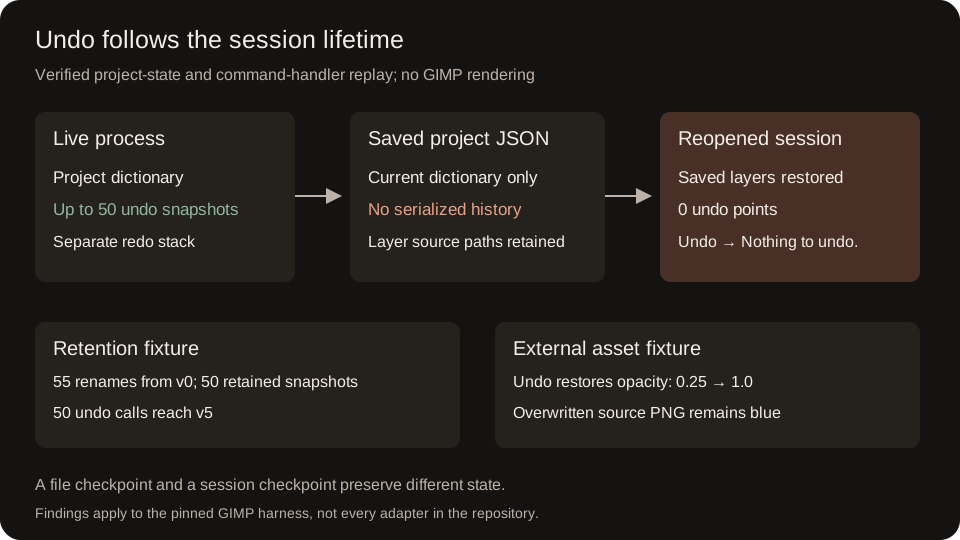
Three Commands, Three Session Lifetimes
The harness has a Click command layer, a project dictionary module, layer and filter operations, export code, and backend utilities. Its .gimp-cli.json file records the canvas, layers, and related editing state. This is substantive application-adapter code with a testable state model.
The command entry point keeps _session as a module global. A one-shot command loads the selected project when its session has none. After a successful command, the result callback saves modified state when a project path is available. The REPL keeps the process and its session alive across commands.
I retrieved the pinned harness modules into /tmp/cli-anything-note, then ran these as separate processes:
PYTHONPATH=/tmp/cli-anything-note python -m cli_anything.gimp --json project new --width 16 --height 16 --name replay --output /tmp/cli-anything-note/replay.gimp-cli.json
PYTHONPATH=/tmp/cli-anything-note python -m cli_anything.gimp --json --project /tmp/cli-anything-note/replay.gimp-cli.json layer new --type solid --name Background
PYTHONPATH=/tmp/cli-anything-note python -m cli_anything.gimp --json --project /tmp/cli-anything-note/replay.gimp-cli.json session undo
The first two exited with code zero. The last exited with code one:
{"error": "Nothing to undo.", "type": "RuntimeError"}
The layer command had taken a snapshot before mutating the project. Its process then exited. The next process loaded the saved layer but constructed a fresh session, with no snapshots from the previous command.
For comparison, the probe invokes the same Click command handlers through CliRunner while retaining one module-global session. Project creation, layer creation, and undo all succeed there. This is an in-process handler test, not an automated run of the interactive terminal UI:
{"sharedProcessCommands": {"exitCodes": [0, 0, 0], "layersAfterUndo": 0}}
{"freshSessionCommand": {"exitCode": 1, "error": "Nothing to undo.", "persistedLayers": 1}}
Replacing the process-local session before the last command reproduces the history loss while retaining the saved layer. That agrees with the separate-process CLI run.
The Save Method Writes One Dictionary
The session implementation maintains _undo_stack and _redo_stack separately from project. A snapshot deep-copies the current project, adds a description and timestamp, and clears redo history. Undo moves the current dictionary onto the redo stack and restores a previous dictionary.
The save_session() docstring promises “project + undo history.” Its implementation serializes self.project only. Opening that JSON and passing it into set_project() explicitly clears both stacks.
I renamed a project, exercised undo and redo, saved it, then reopened it in a new Session. The probe verified that the saved dictionary has no history fields and that the reopened project retains its final name:
{"saveAndReopen": {"liveUndoPoints": 1, "reopenedUndoPoints": 0, "reopenedName": "after"}}
The discrepancy is specific to this method and revision. It does not mean project saving failed. It means an agent cannot use that save method as a checkpoint for later undo commands.
A Count Limit, With a Definite Oldest State
MAX_UNDO is 50. When a new snapshot exceeds that count, the implementation removes the oldest entry. I started at project name v0, took a snapshot before each of 55 renames, and then undid 50 times:
{"retention": {"mutations": 55, "retainedUndoPoints": 50, "oldestReachableName": "v5"}}
The cap behaves as written. The original v0 state has fallen out of the live history. A separate branch fixture confirmed that making a new edit after undo clears the old redo branch.
This is a bound on snapshot count. Each entry deep-copies the project dictionary, so the cap alone says nothing about a byte budget for unusually large projects. I did not measure memory consumption.
Deep Copy Stops at the Asset Path
The layer module stores an image layer's source as a filesystem path. Copying the dictionary copies that path value; it does not capture the image bytes behind it.
For a controlled fixture, I created a valid one-pixel red PNG and added it through add_from_file(). I took a snapshot, changed the layer opacity to 0.25, and overwrote the source file with a blue pixel. After undo, opacity returned to 1.0. Reading the source image still returned blue:
{"externalAsset": {"restoredOpacity": 1.0, "pixelAfterUndo": [0, 0, 255]}}
The external overwrite was an explicit fixture action, not an observed side effect of a harness command. It demonstrates what the snapshot owns. It does not show a rendering mismatch or establish how GIMP caches an opened image.
| State | Owner in the tested path | Survives project reopen? | Restored by live undo? |
|---|---|---|---|
| Project dictionary | Session and project JSON | Yes | Yes, within retained history |
| Undo and redo stacks | Current process | No | They control the operation |
| Referenced image bytes | External filesystem file | Unchanged by reopen | No |
Replaying the Boundaries
The probe verifies the source blobs of all fourteen retrieved Python modules before importing them. It creates its own temporary projects and image fixture, then checks save/reopen behavior, retention, redo branching, asset scope, and command-session lifetime. No model or external service is involved.
I ran:
python public/blog/fifty-undo-points-no-saved-history/session-probe.py /tmp/cli-anything-note
The process exited with code zero. To replay from a checkout with Click and Pillow installed:
git clone https://github.com/HKUDS/CLI-Anything CLI-Anything
git -C CLI-Anything checkout 34f519533bc175d2fe287ab8316b0dd99bb9cc43
python session-probe.py ./CLI-Anything
The final line is:
PASS: save/reopen, retention, redo branching, external assets, and command-session boundaries
The useful contract for an agent is concrete: a persistent session provides bounded dictionary undo, project saving retains the current editing state, and external assets need their own recovery mechanism. Retrying a one-shot undo after reopening the file cannot recover history that was never serialized.